


Qtoon : Manga & Comics
0.00.00 Reviews
App Specs
- Version
- 1.0.0
- Updated On
- License
- Free
- Downloads
- 10,000+
- Developer
- StackForges
- Categories
- Comics
- Platform
- Android
Screenshots
 Analysis by AppCompare
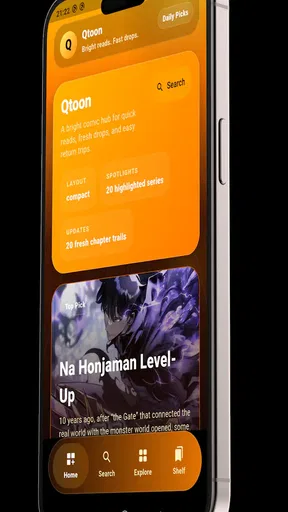
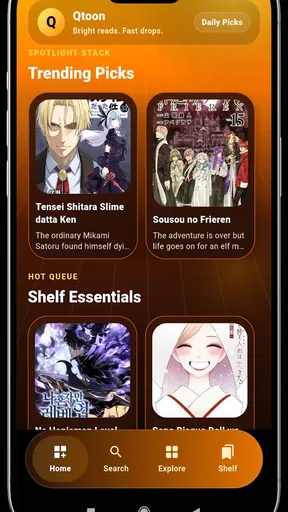
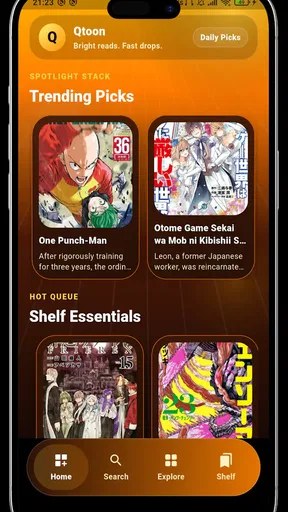
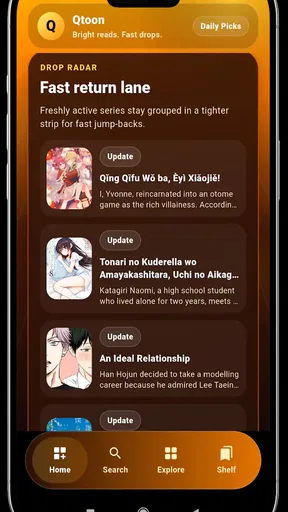
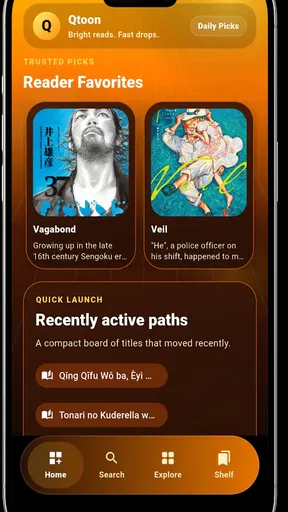
I approached Qtoon: Manga & Comics as a reader looking for one place to browse manga, comics, manhwa, and webtoons without turning the experience into a chore. It is a free comics app from StackForges, aimed at Everyone, and its main appeal is easy to understand: fast-moving reading material paired with discovery tools that help you find something beyond the title you already know.
What makes the app worth considering is not simply the size of its reading category, but the way it tries to shorten the distance between opening the app and finding a series that fits my mood. I can imagine using it during a commute, before bed, or in a short break when I want a chapter rather than a long search through several separate services. At the same time, a discovery-focused reader needs to accept that convenience is not the same as having every favorite series, every publisher, or every reading option in one place.
How Qtoon feels when I start reading
The first impression is shaped by the app’s promise of quick updates and smart discovery. Those two ideas matter for different reasons. Updates are useful when I am following an ongoing story and do not want to repeatedly check several sources. Discovery matters when I have finished a series and need help choosing what comes next. In my experience with this kind of app, the second part often determines whether I keep it installed, because a large catalog is less helpful when browsing feels directionless.
Qtoon is currently at version 1.0.0, so I see it as an early product rather than a mature reading ecosystem. That does not automatically make it a poor choice. A focused first release can feel lighter and easier to understand than a crowded platform, but it also means I would approach it with practical expectations. I would use it as a convenient reading and discovery tool, while keeping my most important reading habits flexible in case a particular series or workflow is not supported exactly as I prefer.
The app runs on Android 7.0 and later, which gives it a broad compatibility range for people using older phones. That is helpful for readers who do not replace devices often. It also means that the experience may vary more noticeably between a recent handset and an older one, especially when browsing image-heavy pages or switching quickly between a long reading session and the catalog.
Speed expectations in everyday browsing
For a comics reader, perceived speed is about more than opening the application. I pay attention to how quickly I can move from a discovery screen to a title, from a title to a chapter, and from one page or panel to the next. A reader can tolerate a brief pause at startup more easily than repeated interruptions in the middle of a chapter. Qtoon’s emphasis on fast updates sets a useful expectation for content freshness, but it should not be confused with a guarantee that every screen will feel equally quick on every phone or connection.
My preferred workflow is to browse with a specific purpose. I might begin with a familiar genre, inspect a few covers or summaries, and then save one or two possibilities for later rather than opening every result at once. This reduces unnecessary loading and makes the discovery side feel more deliberate. It is also a good way to judge the app fairly: if I can find a promising series without endless scrolling, Qtoon is doing something valuable even before I have read a full chapter.
Worth Reading Before You Choose

Switching to Android Auto Means Rethinking Your Driving Routine

Google Calendar Makes a Crowded Week Easier to Manage

Baby Panda World Brings Quick Play to Modern Phones, but Its Game Library Feels Busy

ESPN’s Live Game View Makes Following Close Games Easier

QuizzLand Review: A Good Fit for Short Trivia Breaks, Not Every Player

Basketball Stars: Multiplayer Is Fast, but Can It Recover When Matches Go Wrong?
One useful habit is to separate discovery from reading. I would spend a few minutes choosing a series while I have a stable connection, then read it later when I am less distracted. This approach is especially sensible for someone using an older device, because fewer simultaneous tasks can make the overall experience feel steadier. It also prevents a short break from disappearing into aimless catalog browsing.
What happens during heavier use
Heavy use for Qtoon is not the same as heavy use for a game. The demanding moments are likely to come from image-rich catalog screens, long vertical webtoon chapters, rapid movement between chapters, and extended sessions in which the display remains active. I would judge the app by whether it keeps the reading flow comfortable rather than by expecting it to behave like a high-performance game.
A realistic scenario is a train ride where I open the app, search for a series, read several chapters, and return to the catalog before the journey ends. That session combines browsing, repeated image loading, and frequent navigation. If the phone is older or storage is tight, I would avoid opening many titles in separate screens and would close other demanding apps first. This is not a criticism unique to Qtoon; visual reading apps naturally ask more from a device than a text-only reader.
Long vertical webtoons also create a different challenge from traditional page-based manga. With a page layout, I can orient myself quickly and turn pages at a predictable rhythm. A vertical format encourages continuous scrolling, which can be comfortable but may make it easier to lose my place if I stop suddenly. I would pause at natural chapter breaks and note the title and chapter before leaving a session. That small habit is useful when reading across several series.
Another trade-off appears when discovery is the main activity. Smart recommendations can save time, but they can also encourage constant switching. I get more value from the app when I choose a short reading list instead of treating every recommendation as something I must inspect immediately. For me, the strongest workflow is discovery first, focused reading second.
Reliability and recovering from interruptions
Reliability matters particularly when a reading app is used away from home. A phone call, a weak signal, a low-battery warning, or a quick switch to another application can interrupt a chapter without warning. I would therefore test Qtoon in ordinary situations rather than judging it only during a perfect Wi-Fi session: open a title, leave it briefly, return to it, and check whether continuing feels straightforward.
The app’s value is highest when recovery is simple. If I am halfway through a chapter, I want to spend my time reading rather than reconstructing where I stopped. I would make a habit of remembering the series and chapter before leaving a session, especially while I am still learning how Qtoon handles navigation. That is a practical safeguard, not a substitute for built-in continuity, but it keeps a small interruption from becoming a frustrating search.
For readers who follow ongoing titles, update timing is another part of reliability. The store summary highlights fast updates, which makes Qtoon appealing as a place to check for new material. Still, I would not build my entire reading schedule around an immediate release moment. Different series can follow different publishing rhythms, and a discovery app is better viewed as a convenient place to monitor reading interests than as a promise that every title will appear at exactly the same time.
I also prefer to keep expectations realistic about catalog continuity. A title being easy to discover today does not necessarily mean it will remain the center of my reading routine forever. If a series is especially important to me, I would keep track of its name and current chapter independently. That makes switching between reading services less painful and avoids treating one app as the only possible home for a long-running story.
Older phones, newer phones, and practical limits
Because Qtoon supports Android 7.0 and above, it is accessible to people with a wide range of devices. That is one of its practical strengths. Someone with an older phone can try a modern comics reader without needing to upgrade immediately. However, compatibility is only the starting point. Screen size, available storage, connection quality, and the phone’s ability to handle sustained image viewing will still shape the experience.
On a small display, manga pages may require more zooming or repositioning, while vertical webtoons can be easier to follow because their layout naturally suits scrolling. On a larger screen, browsing covers and reading panels should feel more relaxed, but the app still has to work within the device’s available memory and network conditions. I would choose the format that matches the phone rather than assuming every kind of comic will feel equally comfortable.
Storage is another consideration for frequent readers. Even without assuming how Qtoon manages files, a person who reads many image-heavy chapters should keep some free space available for the phone itself. A crowded device can make every app feel less responsive, and comics apps are particularly visible when images take time to appear. Periodic housekeeping—removing unused downloads or clearing old reading clutter where the system allows it—can help maintain a smoother routine.
Battery use is best approached through session length. Reading for a few minutes is a light everyday activity, while a long continuous session with a bright display and repeated image loading naturally asks more from a phone. I would lower screen brightness to a comfortable level and avoid leaving the app open when I am finished. These are simple steps, but they matter more than chasing a theoretical performance score.
Where it fits beside familiar alternatives
Qtoon competes with several kinds of reading alternatives, not just one. Some readers prefer official publisher or platform apps because their favorite series, release schedules, and licensing arrangements are central to the experience. Others use browser bookmarks, dedicated manga readers, or separate services for manhwa and webtoons. Qtoon’s advantage is the possibility of bringing several reading interests into one discovery-oriented space.
That convenience is most attractive to a reader who moves between formats. If I read manga one day, a manhwa the next, and a webtoon after that, a single app can reduce the friction of remembering which service contains which type of story. The compromise is that a general discovery app may not provide the same depth, consistency, or specialized tools as a service built around one publisher, one region, or one format.
I would choose an official alternative when ownership, licensed availability, creator support, or a particular publisher’s release schedule is my top priority. I would choose a browser when I only read occasionally and do not want another dedicated app. I would choose Qtoon when I want a focused comics shelf with discovery at the center and I am comfortable evaluating each title according to my own reading needs.
The free price lowers the barrier to trying it. That is important for casual readers who are unsure whether a dedicated comics app will become part of their routine. It also means I can judge the actual browsing and reading flow without first committing money. Free access alone is not a reason to stay, though; the app still needs to make finding and returning to stories easier than my existing habits.
Who will get the most from Qtoon?
I think the best fit is a curious reader who enjoys sampling different forms of sequential art and wants recommendations to play a meaningful role. It is also suitable for someone who reads in short sessions and appreciates having manga, comics, manhwa, and webtoon interests close together. The Everyone content rating makes it approachable as a general-audience app, although individual stories can still vary in tone and subject, so I would always check a title before handing the phone to a child.
It is less convincing for a reader who already has a carefully organized library in one official service and rarely wants to explore outside it. It may also be a poor match for someone who expects advanced collection management, a highly specialized reading interface, or guaranteed access to a particular series. In those cases, a dedicated alternative may feel more dependable even if it offers less variety in one place.
For a family device, I would treat the age rating as a broad accessibility signal rather than a substitute for supervision. The app itself is rated Everyone, but comics are not all interchangeable. A parent can still guide younger readers toward suitable titles and avoid assuming that the category label describes every story available through discovery.
My practical reading routine
If I were setting up Qtoon for regular use, I would begin with three small tests. First, I would search for a title I already know to see how quickly I can reach it. Second, I would browse without a specific title in mind and check whether the discovery experience produces genuinely interesting options rather than just more scrolling. Third, I would read long enough to understand how comfortable the navigation feels on my particular screen.
After that, I would keep a compact rotation of current reads instead of filling my attention with every new suggestion. This makes updates easier to notice and reduces the chance of forgetting where I stopped. I would also use a stable connection for initial browsing when possible, then reserve weaker-signal moments for a title I have already selected. That workflow gives the app a fair chance to feel quick and keeps network uncertainty from dominating the session.
One less obvious benefit of this approach is that it exposes the difference between discovery quality and catalog quantity. If Qtoon helps me choose confidently from a small set of appealing options, it is doing more for me than an enormous but confusing list. I would pay attention to that feeling over several sessions. The app earns a place on my phone when it reduces decision fatigue, not merely when it presents more covers.
I would also revisit the app after a few days rather than making a decision after one launch. A comics reader becomes useful through repetition: finding a title, returning to it, checking for an update, and moving on to something new. That cycle is where the promised fast updates and smart discovery either become part of my routine or fade into background decoration.
Developer, availability, and overall value
StackForges presents Qtoon as a free app in the Comics category, and its early footprint is already above ten thousand installs. That suggests there is enough interest for readers to try it, while the current version still places the product near the beginning of its public life. I would interpret that combination as an invitation to explore rather than as proof that it will replace every established reading service.
The release date is July 3, 2026, and that timing reinforces my view of Qtoon as a young app with room to establish its identity. For a reader, the benefit of trying an early product is that the interface may feel direct and uncluttered. The risk is that long-term habits, broader catalog confidence, and recovery behavior may still need to prove themselves through continued use.
My performance verdict is cautiously positive. Qtoon makes sense when I want a free, cross-format comics app that emphasizes finding new material and checking for updates. Its Android 7.0 support gives it useful reach, and its purpose is clear enough for a short trial. I would not install it expecting a guaranteed replacement for an official service, nor would I recommend it to someone who needs one specific publisher’s ecosystem above all else.
For me, the deciding question is simple: does Qtoon make the next good read easier to find without creating more management work than it removes? If the answer is yes on my phone and with my preferred titles, it becomes a handy everyday companion for manga, comics, manhwa, and webtoons. Its strongest promise is convenience through discovery, while its sensible limitation is that convenience cannot replace the certainty of a specialized official library.
Overall, I would recommend giving Qtoon: Manga & Comics a trial to readers who enjoy variety, browse often, and want a lightweight starting point for their next series. I would keep an alternative nearby for must-read titles and use the app with a focused routine: discover deliberately, read in manageable sessions, and keep track of important series. That balance lets Qtoon do what it appears designed to do without asking it to solve every problem in digital comics reading.
Pros
- Large catalog of manga
- manhwa
- and webcomics in one app.
- Clean reader interface makes chapters comfortable to browse.
- Personal libraries help organize saved series and reading progress.
- Regular updates can add fresh chapters and new titles.
- Supports casual reading with convenient mobile access.
Cons
- Some titles or chapters may require coins or a paid subscription.
- Availability of series can vary by country and licensing agreements.
- Advertisements may interrupt browsing for free users.
- Translation quality may differ between titles and chapters.
- Offline reading options may be limited for some content.
FAQs for Qtoon : Manga & Comics
What is Qtoon: Manga & Comics, and what kind of content does it offer?
Qtoon: Manga & Comics is a mobile reading app focused on digital manga, manhwa, webtoons, and comic-style stories. Its catalog may include romance, drama, fantasy, action, thriller, and other popular genres. Before downloading, readers should browse the available library and check whether the series they enjoy are offered in their region, since content, translations, and availability can change over time.
Is Qtoon: Manga & Comics free to use?
The app can generally be downloaded without an upfront charge, but access to every chapter may not be completely free. Some stories can use coins, credits, tickets, subscriptions, advertisements, or other in-app purchase systems. It is worth reviewing the pricing information carefully before unlocking chapters, especially if you plan to read several ongoing series. App-store purchase restrictions can also help prevent accidental spending.
Does Qtoon support offline reading?
Offline reading depends on the features currently provided by Qtoon and may vary between titles or account types. If a download option is available, chapters usually need to be saved while connected to the internet and may remain accessible only inside the application. Readers should also check storage requirements, download limits, and whether saved chapters expire or require periodic online verification.
Is Qtoon: Manga & Comics safe for children and teenagers?
Parents should not assume that every title in Qtoon is suitable for children. Manga and webtoon catalogs often contain different age ratings and may include mature themes, violence, romance, suggestive scenes, or strong language. Before allowing a younger user to read, review the app’s content labels, privacy settings, and parental controls. Account and payment settings should also be protected with device-level authentication.
What permissions and account features should I expect when using Qtoon?
Qtoon may request permissions or account information needed for functions such as creating a reading profile, synchronizing progress, sending notifications, processing purchases, or recommending content. The exact requirements can differ by device and app version. Before registering, read the privacy policy and review notification settings. If you prefer not to share unnecessary information, deny optional permissions and use the minimum account details required.


